Hue Scale
Hue Scale
A conceptual platform for analysing and benchmarking colour systems in digital products
A conceptual platform for analysing and benchmarking colour systems in digital products
DURATION
January 2026 - March 2026
ROLE
Product Designer / Solo Project
TOOL
Figma
Overview
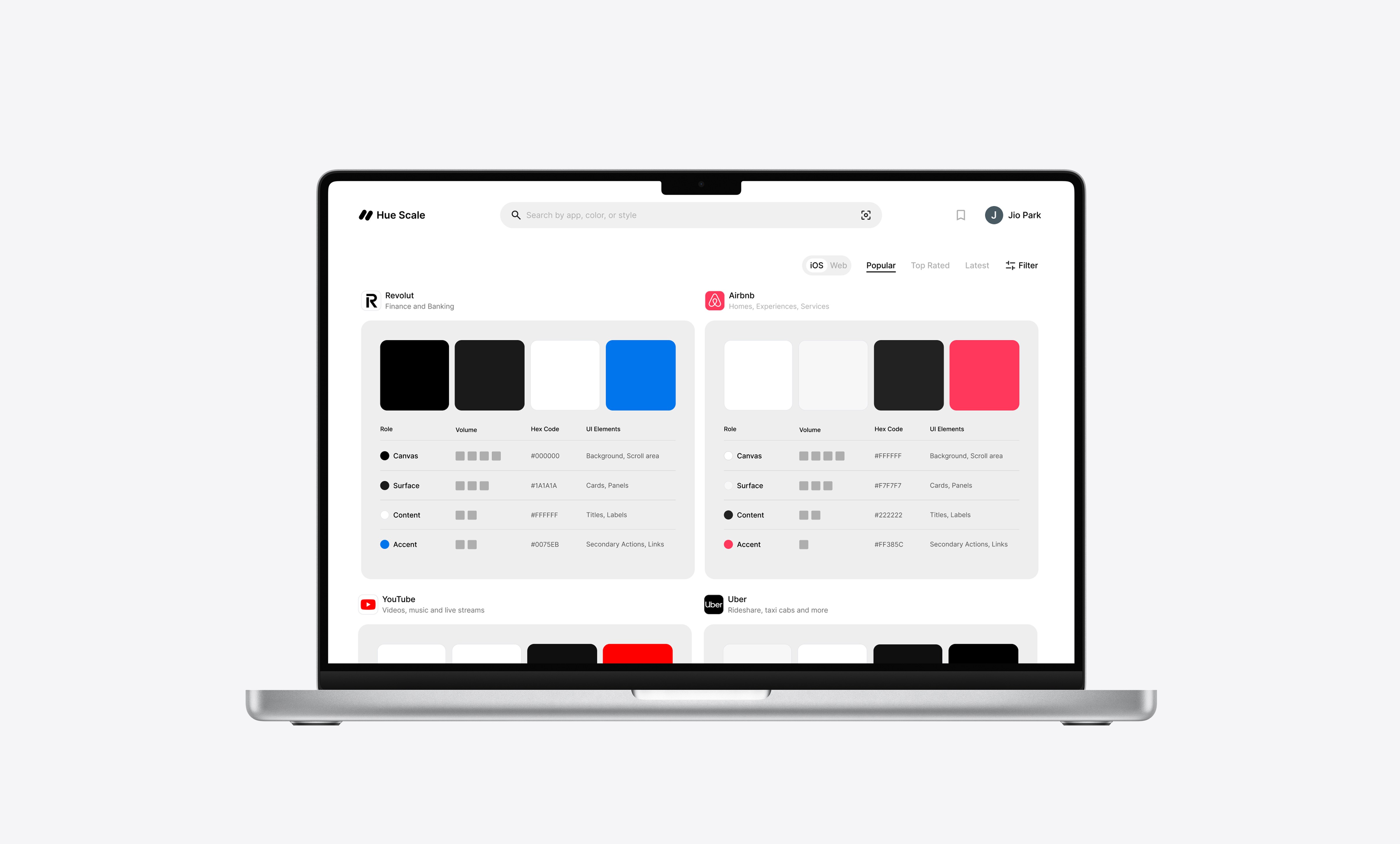
Hue Scale is a conceptual platform that helps designers analyse and benchmark colour systems used in digital products. Rather than simply showcasing UI screenshots, the platform structures colour usage into comparable roles and connects palettes to real interface contexts. This project focused on turning visual inspiration into a more structured benchmarking experience for designers.
Hue Scale is a conceptual platform that helps designers analyse and benchmark colour systems used in digital products. Rather than simply showcasing UI screenshots, the platform structures colour usage into comparable roles and connects palettes to real interface contexts. This project focused on turning visual inspiration into a more structured benchmarking experience for designers.
Problems
Designers often reference existing products to understand colour usage, but most resources focus on visuals rather than structure. The challenge was not access to references, but the lack of a consistent way to interpret them.
Designers often reference existing products to understand colour usage, but most resources focus on visuals rather than structure. The challenge was not access to references, but the lack of a consistent way to interpret them.
01
Colour systems are difficult to compare across products because each app uses its own naming conventions and internal structure.
Colour systems are difficult to compare across products because each app uses its own naming conventions and internal structure.
02
Palettes show colour values, but not the hierarchy between dominant, supporting, and interactive colours.
Palettes show colour values, but not the hierarchy between dominant, supporting, and interactive colours.
03
Screenshots show visual outcomes, but not how colours are applied across specific interface elements and states.
Screenshots show visual outcomes, but not how colours are applied across specific interface elements and states.
Approach
Defining What to Compare
The core challenge was creating a classification model that could be applied consistently across any product, regardless of how that product's design system was internally structured or documented. I went through several iterations of how to define colour roles before settling on a model that reflected how colour is actually perceived in an interface, rather than how it is defined behind the scenes.
The core challenge was creating a classification model that could be applied consistently across any product, regardless of how that product's design system was internally structured or documented. I went through several iterations of how to define colour roles before settling on a model that reflected how colour is actually perceived in an interface, rather than how it is defined behind the scenes.
This resulted in four core roles:
Canvas
The base background of the interface
The base background of the interface
Surface
Containers such as cards, panels, and sheets
Containers such as cards, panels, and sheets
Content
Text, Icons and Informational elements
Text, Icons and Informational elements
Accent
Interactive elements and highlights
Refining how it is represented
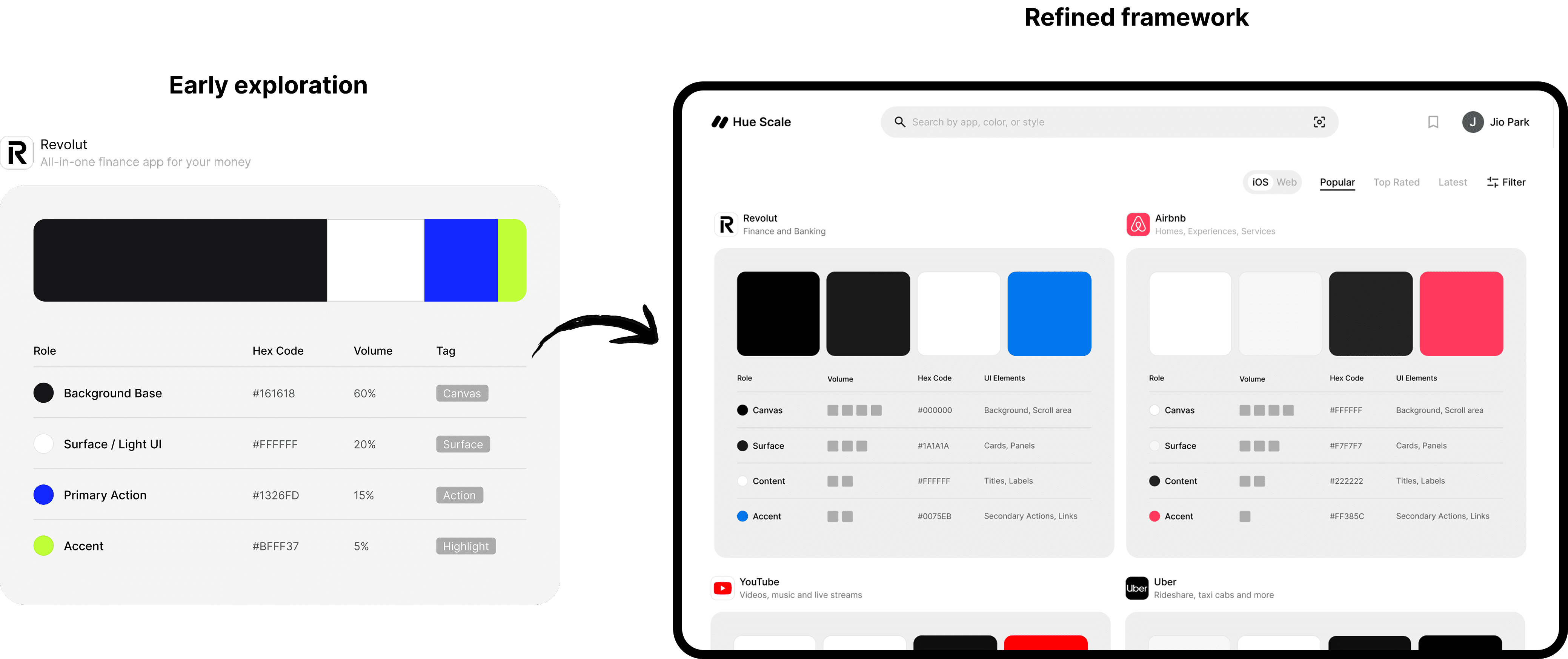
Early experiments used percentage-based bars to represent colour presence. However, this made accent colours look less important than their actual functional role and implied a level of precision that the analysis could not reliably support.
The framework was therefore refined into qualitative Volume levels and a Role Map that prioritised usage context over numeric distribution.
Early experiments used percentage-based bars to represent colour presence. However, this made accent colours look less important than their actual functional role and implied a level of precision that the analysis could not reliably support.
The framework was therefore refined into qualitative Volume levels and a Role Map that prioritised usage context over numeric distribution.
Key Design Decisions
Introducing qualitative
Volume levels
Introducing qualitative Volume levels
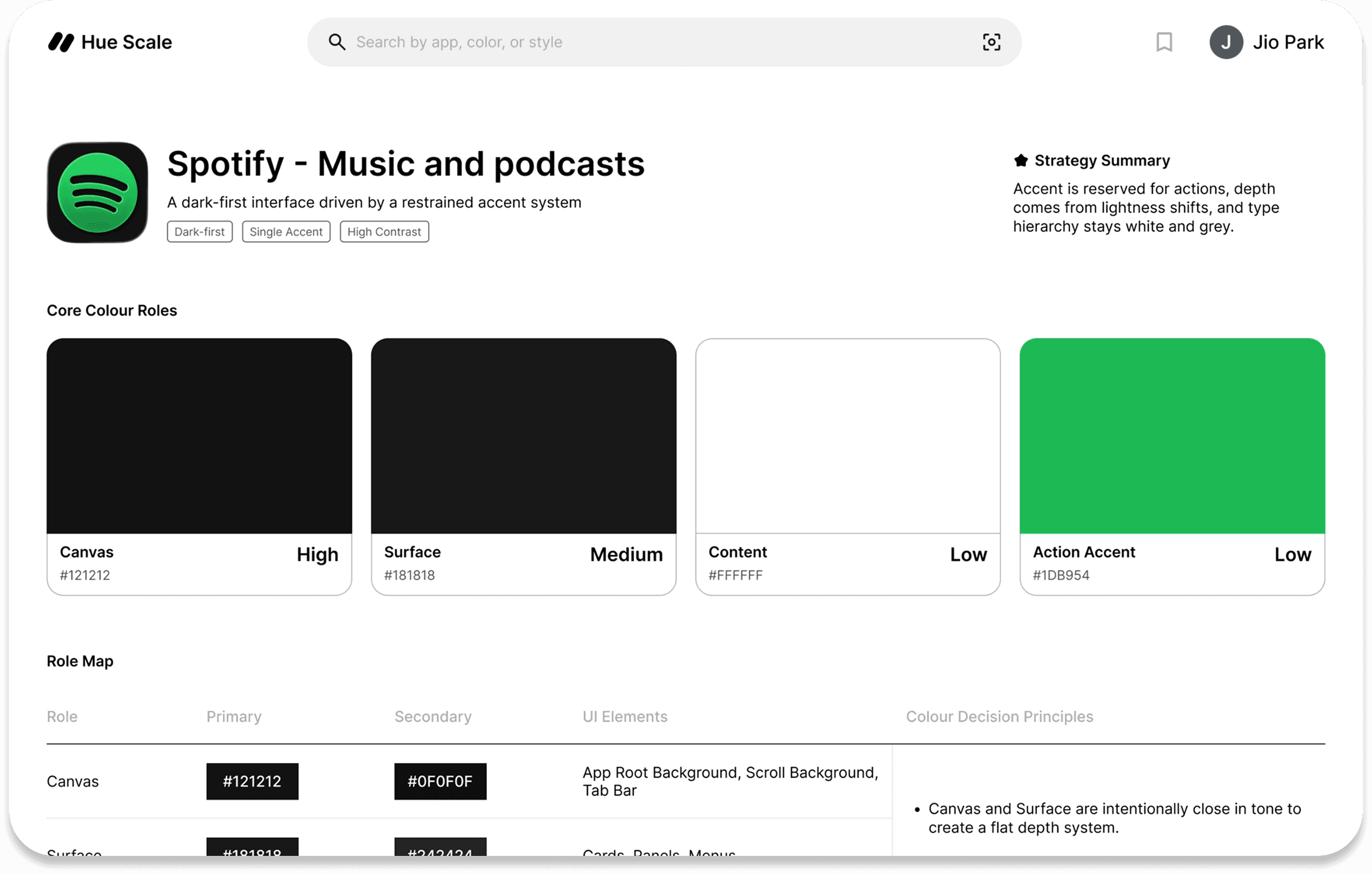
Four Volume levels, High, Medium, Low, and Very Low, were introduced to describe how strongly each colour role appears across an interface. This allowed for quick, readable comparisons without relying on subjective visual judgment.
Four Volume levels, High, Medium, Low, and Very Low, were introduced to describe how strongly each colour role appears across an interface. This allowed for quick, readable comparisons without relying on subjective visual judgment.
Role Map
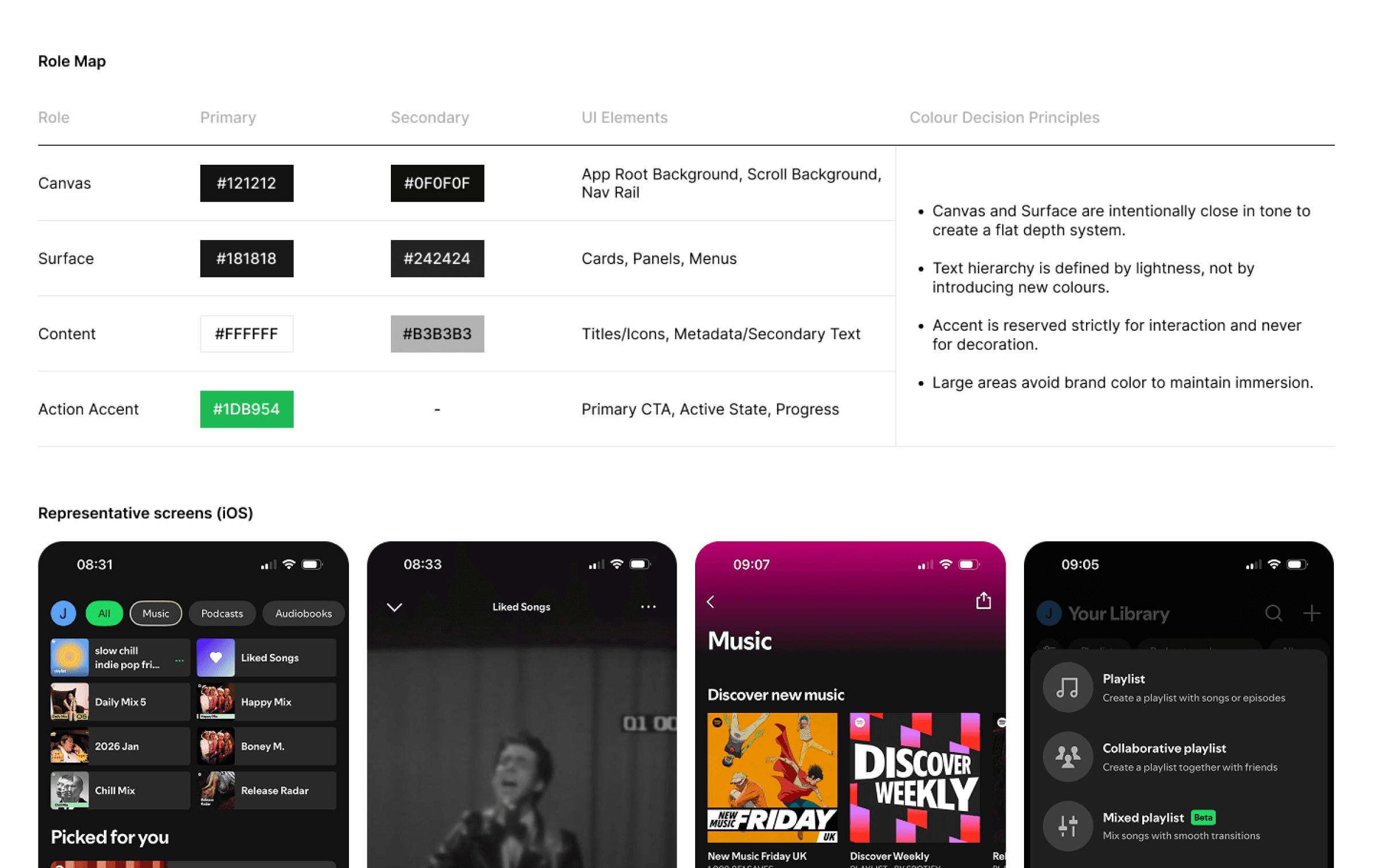
The Role Map was designed to make colour usage explicit, translating palette values into UI context. Primary and secondary values are listed separately to reveal subtle differences, even when colours appear visually similar.
The Role Map was designed to make colour usage explicit, translating palette values into UI context. Primary and secondary values are listed separately to reveal subtle differences, even when colours appear visually similar.
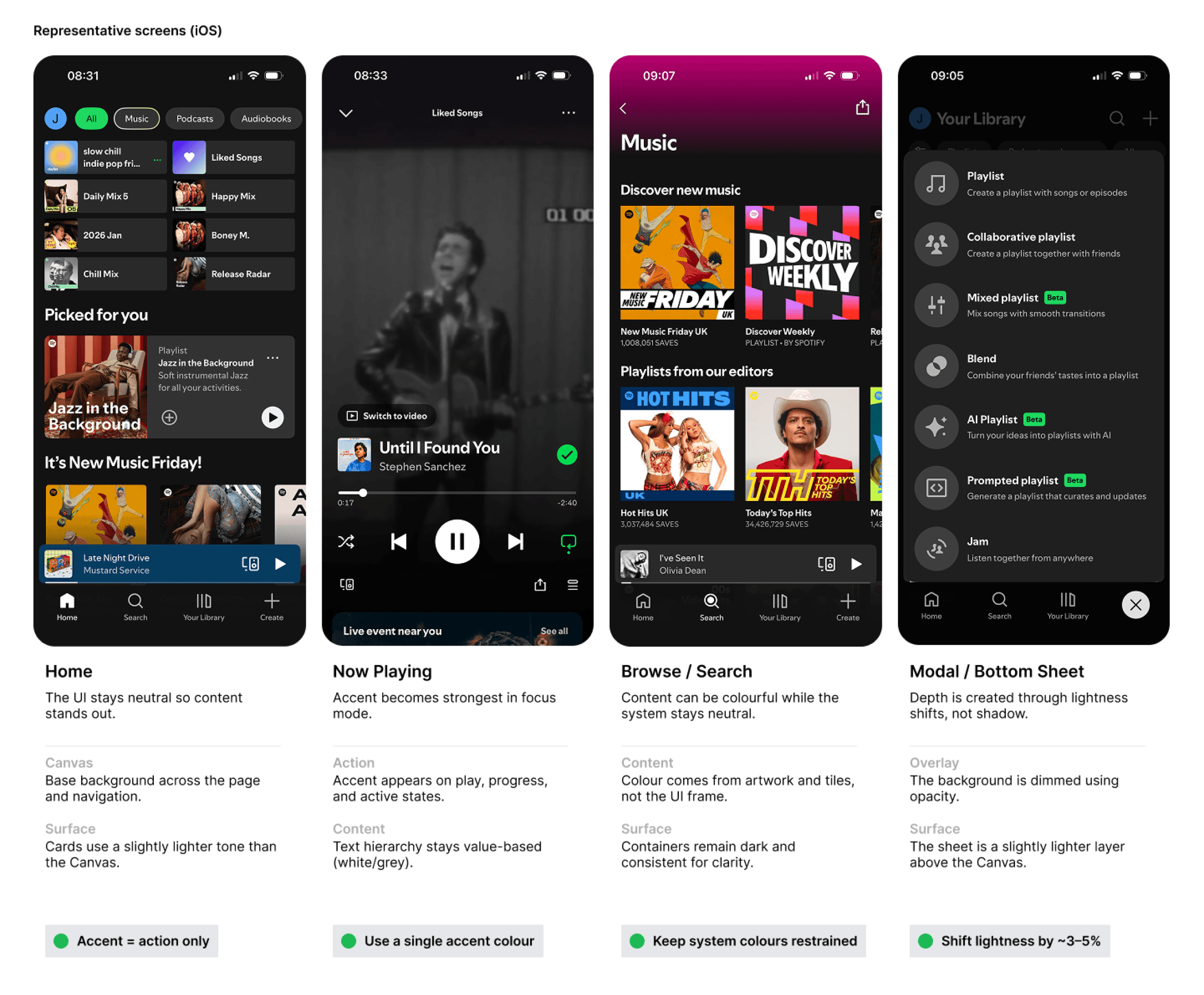
Establishing a four-screen reference rule
Four screens were selected as the minimum set needed to capture the widest range of colour behaviour across a product.
Four screens were selected as the minimum set needed to capture the widest range of colour behaviour across a product.
Product Features
Exploration Filters
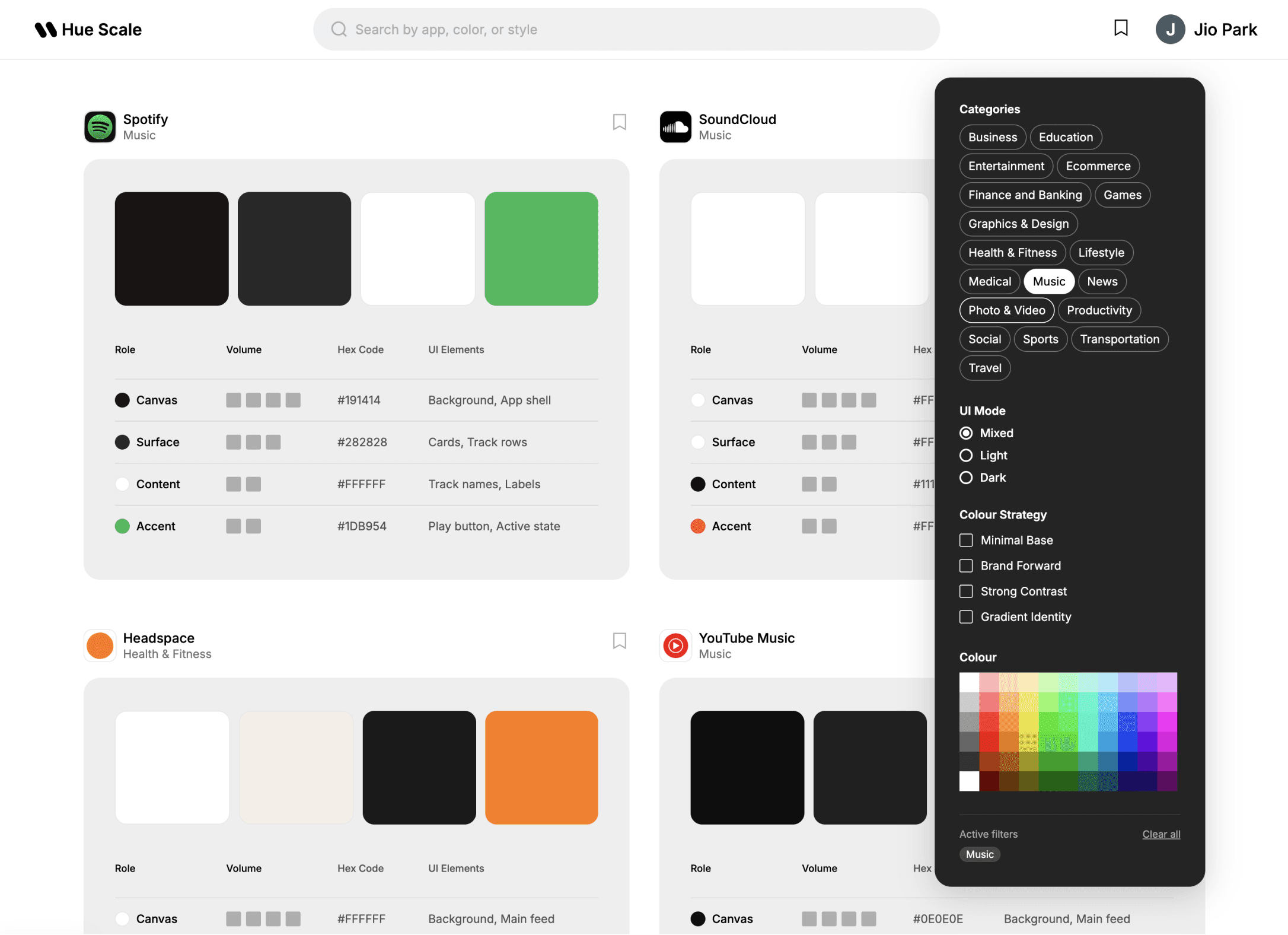
To support open-ended exploration across different types of products, I designed a filtering system that allows users to browse apps by category, UI mode, colour strategy, and dominant colour. This makes it easier to identify patterns within similar product types and compare how colour roles are used across different interfaces, without needing a specific product in mind first.
To support open-ended exploration across different types of products, I designed a filtering system that allows users to browse apps by category, UI mode, colour strategy, and dominant colour. This makes it easier to identify patterns within similar product types and compare how colour roles are used across different interfaces, without needing a specific product in mind first.
Final Design
The final interface translates the colour framework into a structured browsing and analysis experience.
Instead of presenting colour as static palettes, the platform enables designers to explore how colour functions across different products through consistent roles and contexts.
The final interface translates the colour framework into a structured browsing and analysis experience.
Instead of presenting colour as static palettes, the platform enables designers to explore how colour functions across different products through consistent roles and contexts.
Home — Overview and comparison
The home view allows designers to quickly scan and compare colour strategies across multiple products using a consistent role-based layout.
Detail — Context and application
Each product page reveals how colour roles are applied across real interface elements, supported by the Role Map and representative screens.
Filters — Exploration and pattern discovery
Filtering options enable exploration by category, UI mode, and colour strategy, helping designers identify patterns across different types of products.
Home — Overview and comparison
The home view allows designers to quickly scan and compare colour strategies across multiple products using a consistent role-based layout.
Detail — Context and application
Each product page reveals how colour roles are applied across real interface elements, supported by the Role Map and representative screens.
Filters — Exploration and pattern discovery
Filtering options enable exploration by category, UI mode, and colour strategy, helping designers identify patterns across different types of products.
Key learnings
Dark-first products tend to minimise accent usage
Apps such as Spotify and Discord rely heavily on neutral surfaces, using accent colours more selectively for interaction states.
Apps such as Spotify and Discord rely heavily on neutral surfaces, using accent colours more selectively for interaction states.
Finance products often prioritise contrast for clarity
Products like Revolut and Wise use strong contrast and functional accent colours to support financial data and key actions.
Products like Revolut and Wise use strong contrast and functional accent colours to support financial data and key actions.
Lifestyle products use colour to shape tone and personality
Apps such as Headspace and Airbnb use warmer or more thematic colours to create a distinct mood and brand feel.
Apps such as Headspace and Airbnb use warmer or more thematic colours to create a distinct mood and brand feel.
Outcome
Compare colour strategies across product types
Move from inspiration browsing to structured benchmarking
Understand where colours appear and what role they play
Extract reusable colour patterns for future design system work
Reflection
Hue Scale started as a personal tool to solve a gap I kept running into. The lack of structured, comparable colour references for designers. Building it taught me how much of colour system design is about function and hierarchy rather than aesthetics alone.
If I were to develop this further, I would want to test it with other designers to understand whether the four-role model is intuitive to people outside the project, and whether the Volume levels communicate what I intended. I would also consider expanding the platform to include accessibility data such as contrast ratio scores, to make the analysis more actionable.
Hue Scale started as a personal tool to solve a gap I kept running into. The lack of structured, comparable colour references for designers. Building it taught me how much of colour system design is about function and hierarchy rather than aesthetics alone.
If I were to develop this further, I would want to test it with other designers to understand whether the four-role model is intuitive to people outside the project, and whether the Volume levels communicate what I intended. I would also consider expanding the platform to include accessibility data such as contrast ratio scores, to make the analysis more actionable.