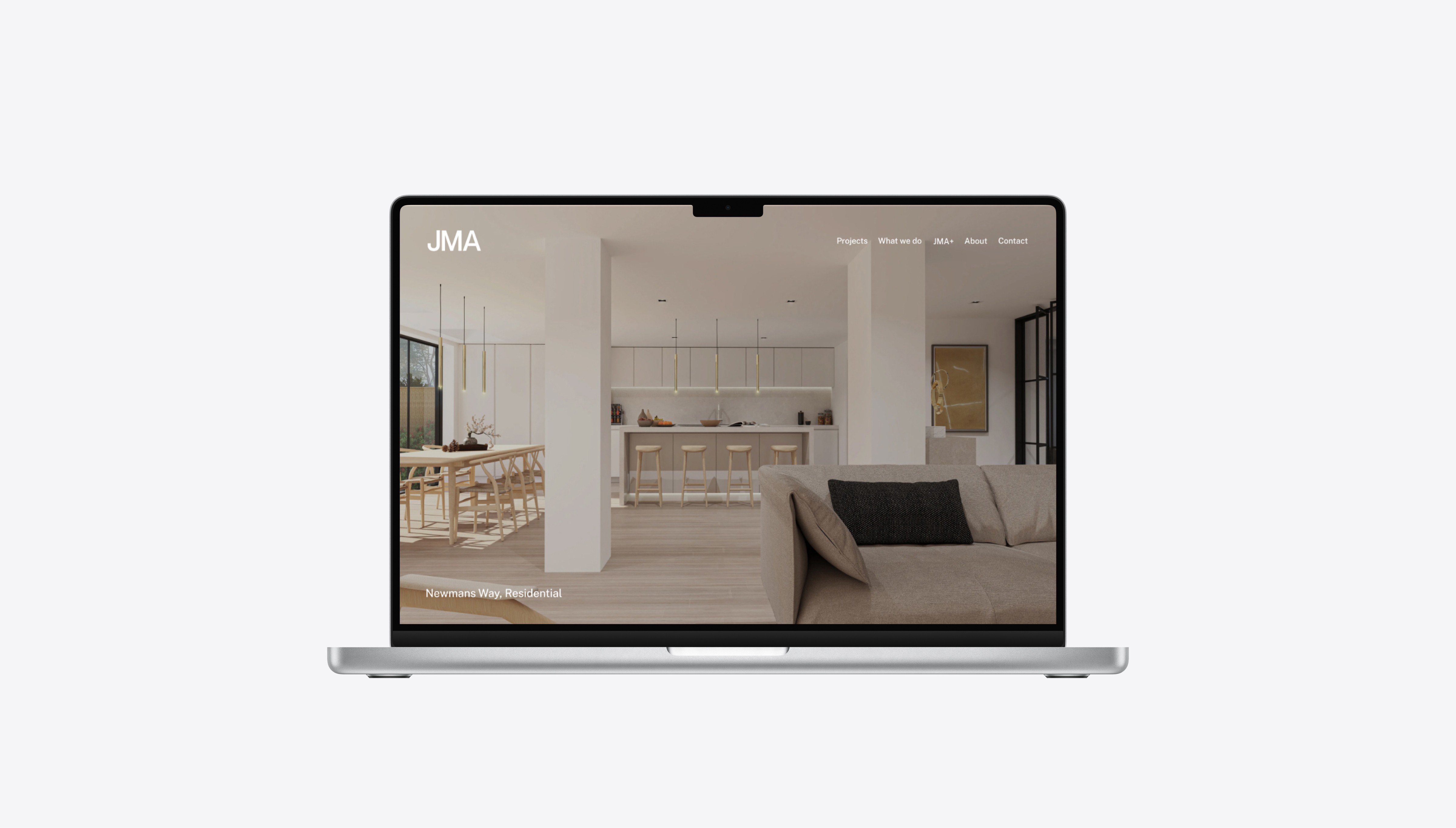
JMA Website Restructure
JMA Website Restructure
A website update focused on clearer content structure and a more consistent browsing experience.
DURATION
September 2024 - January 2025
ROLE
UI / UX Designer
TOOL
Figma, Webflow
Overview
As a freelance UI/UX designer, I worked with Julian McIntosh Architects to restructure their website at a key moment. The studio was expanding beyond architecture into interiors, branding, and digital services under a new offering called JMA+. The challenge was making an expanding studio feel coherent and easy to navigate, not more confusing.
As a freelance UI/UX designer, I worked with Julian McIntosh Architects to restructure their website at a key moment. The studio was expanding beyond architecture into interiors, branding, and digital services under a new offering called JMA+. The challenge was making an expanding studio feel coherent and easy to navigate, not more confusing.

Problem
Early client conversations revealed three connected issues with the existing website.
Early client conversations revealed three connected issues with the existing website.
First, the homepage did not communicate the studio clearly.
It consisted of a single full-screen image with a tagline followed directly by the footer, giving visitors no quick understanding of who JMA was, what the studio did, or how its work was organised.
It consisted of a single full-screen image with a tagline followed directly by the footer, giving visitors no quick understanding of who JMA was, what the studio did, or how its work was organised.
Second, there was no structure in place for JMA+.
The new offering had no dedicated page, navigation path, or supporting content, meaning it effectively did not exist within the site experience.
The new offering had no dedicated page, navigation path, or supporting content, meaning it effectively did not exist within the site experience.
Third, the site lacked visual consistency and hierarchy.
Third, the site lacked visual consistency and hierarchy.
Third, the site lacked visual consistency and hierarchy.
Interior pages such as What we do, About, and Contact opened immediately with text, without a visual entry point or a clear page structure. As a result, the experience felt fragmented and difficult to navigate.
Third, the site lacked visual consistency and hierarchy.
Interior pages such as What we do, About, and Contact opened immediately with text, without a visual entry point or a clear page structure. As a result, the experience felt fragmented and difficult to navigate.
Process

Discovery
I began by auditing the existing site structure, mapping where the information hierarchy broke down and where visitors were likely losing context. The homepage was visually led but informationally empty. Interior pages had no consistent visual entry point, making the overall experience feel fragmented.
I began by auditing the existing site structure, mapping where the information hierarchy broke down and where visitors were likely losing context. The homepage was visually led but informationally empty. Interior pages had no consistent visual entry point, making the overall experience feel fragmented.
Client Alignment
I worked with the client to turn a broad brief into clear priorities: strengthen the homepage message, organise project browsing, introduce JMA+, and unify the interior pages.
Shared visual references helped define the design direction, while early low-fidelity concepts focused discussion on layout and structure.
I worked with the client to turn a broad brief into clear priorities: strengthen the homepage message, organise project browsing, introduce JMA+, and unify the interior pages.
Shared visual references helped define the design direction, while early low-fidelity concepts focused discussion on layout and structure.
Iteration
Several rounds of revision followed, refining how content was prioritised, how pages were sequenced, and how to handle dense project content without overwhelming the reader.
Several rounds of revision followed, refining how content was prioritised, how pages were sequenced, and how to handle dense project content without overwhelming the reader.
Final Outcome
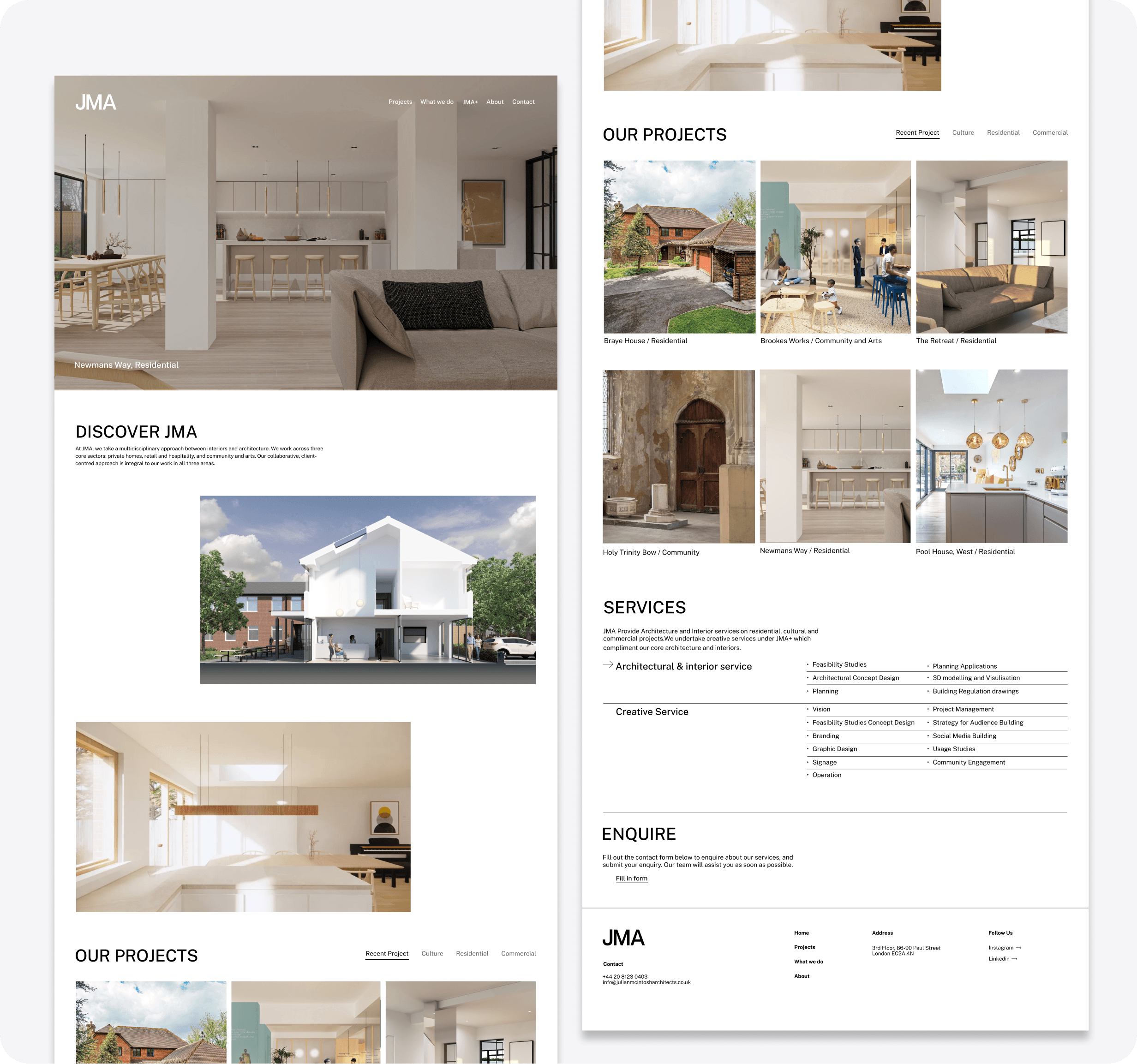
Homepage
The homepage was rebuilt from the ground up. A DISCOVER JMA section was introduced to briefly explain the studio's offer before leading visitors into the work. Projects were reorganised into a categorised grid with filters for Recent, Culture, Residential, and Commercial. A services summary and an enquiry CTA were added to give visitors a clear next step.
The homepage was rebuilt from the ground up. A DISCOVER JMA section was introduced to briefly explain the studio's offer before leading visitors into the work. Projects were reorganised into a categorised grid with filters for Recent, Culture, Residential, and Commercial. A services summary and an enquiry CTA were added to give visitors a clear next step.
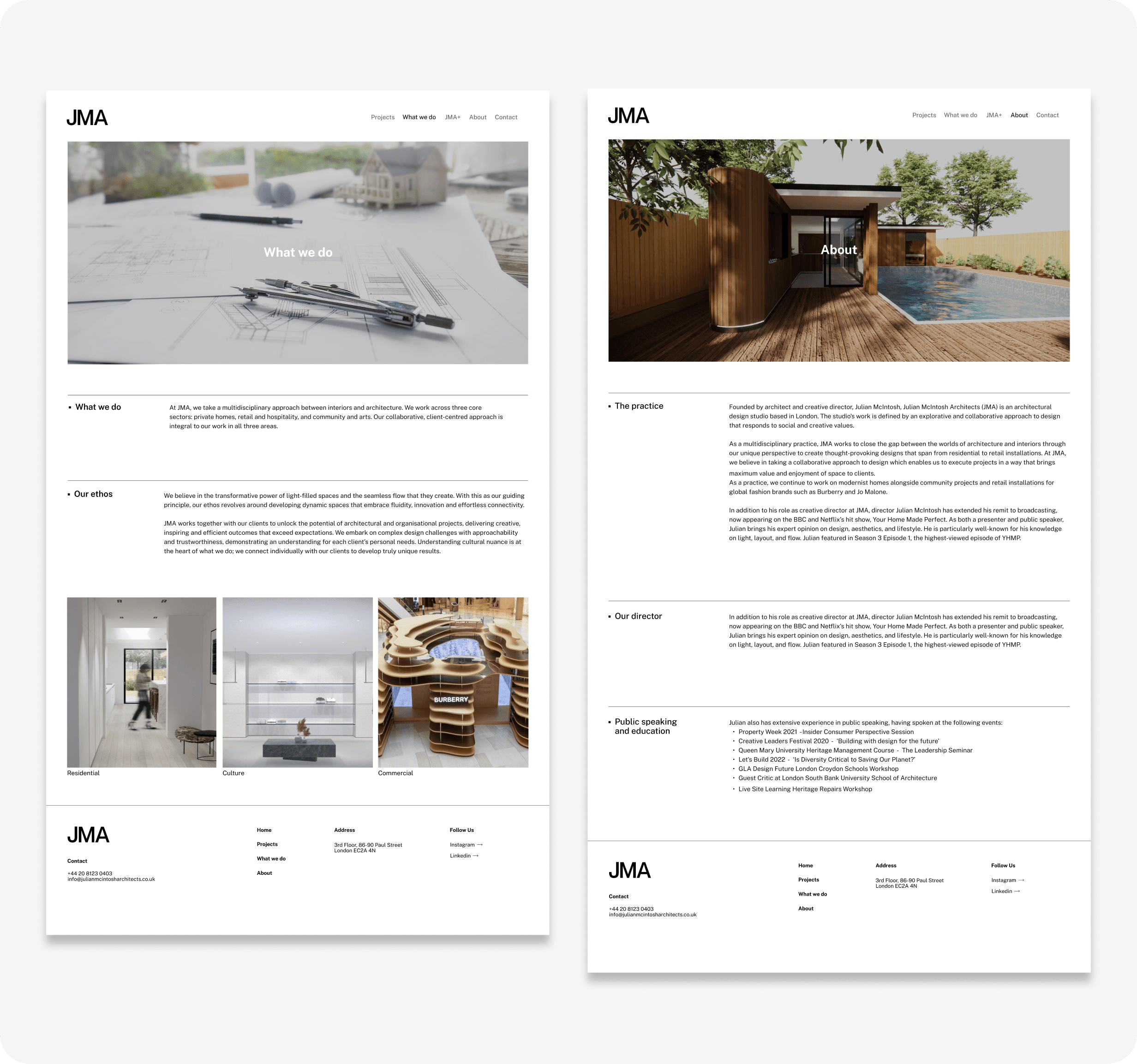
Page Consistency
Every interior page previously began immediately with text. A full-width hero image was introduced at the top of each page to create a visual entry point, and a consistent layout system was applied across headings, text blocks, imagery, and spacing to make the site feel coherent throughout.
Every interior page previously began immediately with text. A full-width hero image was introduced at the top of each page to create a visual entry point, and a consistent layout system was applied across headings, text blocks, imagery, and spacing to make the site feel coherent throughout.
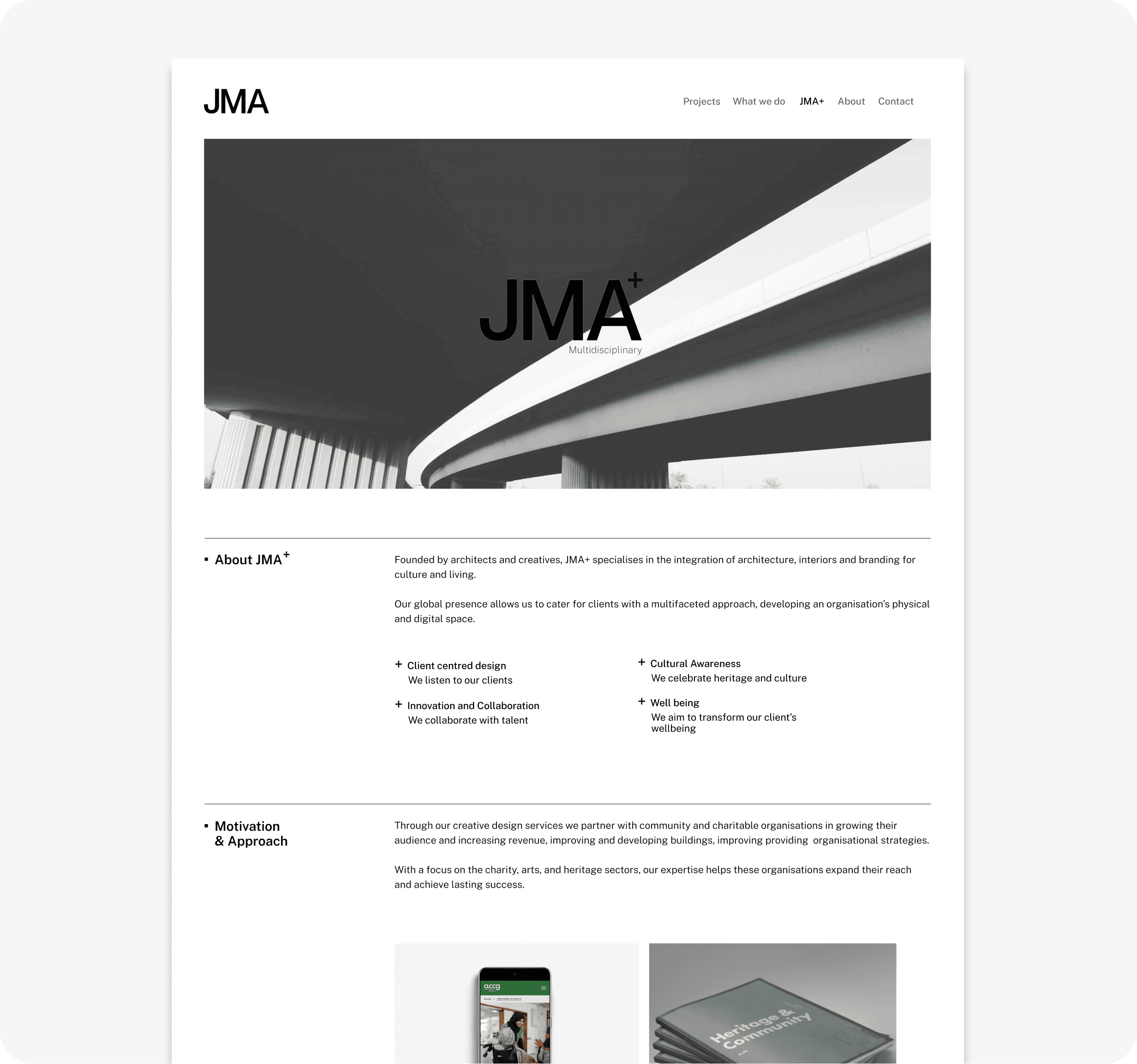
JMA+ Page
A new JMA+ page was designed from scratch to introduce the studio's expanded offering. The page was structured across three clear sections covering what JMA+ is, its motivation and approach, and the services it provides. JMA+ was also added to the main navigation, making it a visible and first-class part of the site.
A new JMA+ page was designed from scratch to introduce the studio's expanded offering. The page was structured across three clear sections covering what JMA+ is, its motivation and approach, and the services it provides. JMA+ was also added to the main navigation, making it a visible and first-class part of the site.
Project Detail Pages
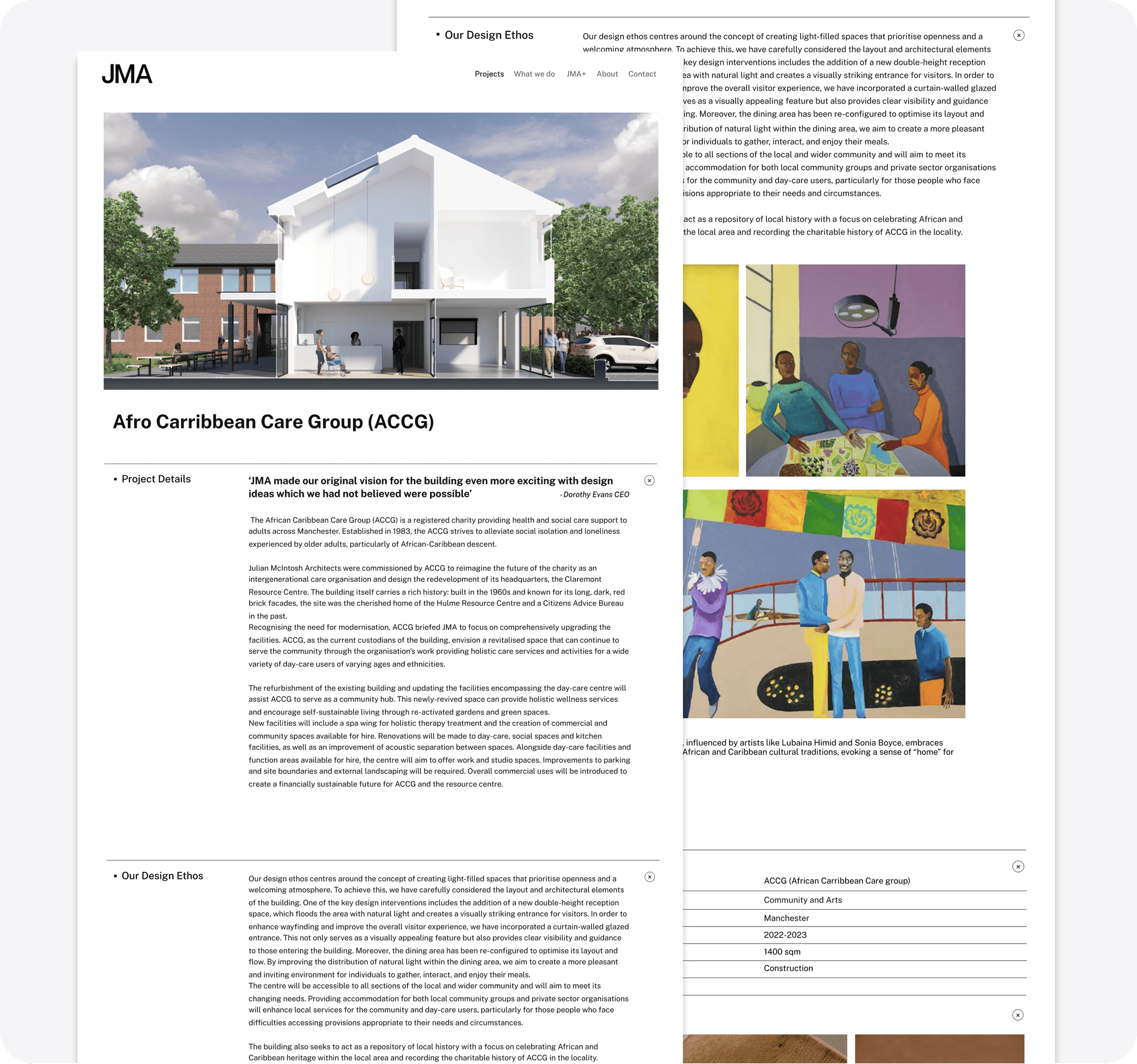
Project pages contained dense, long-form content. To prevent pages from feeling overwhelming, expandable sections were introduced allowing users to reveal and collapse content progressively based on their interest.
Project pages contained dense, long-form content. To prevent pages from feeling overwhelming, expandable sections were introduced allowing users to reveal and collapse content progressively based on their interest.
Reflection
This project taught me how to work within a brief that starts vague and becomes defined through the process. Navigating the tension between the client's visual preferences and cleaner UX decisions, and knowing which decisions were mine to own, was one of the most valuable parts of this experience.
This project taught me how to work within a brief that starts vague and becomes defined through the process. Navigating the tension between the client's visual preferences and cleaner UX decisions, and knowing which decisions were mine to own, was one of the most valuable parts of this experience.
Looking back, there are areas I would approach differently. Some text and colour combinations across the site, including light text over bright imagery and low-contrast body text, do not meet WCAG accessibility standards. These were decisions shaped by the visual direction at the time, but accessibility is something I would advocate for more clearly from the start of the process in future projects.
Looking back, there are areas I would approach differently. Some text and colour combinations across the site, including light text over bright imagery and low-contrast body text, do not meet WCAG accessibility standards. These were decisions shaped by the visual direction at the time, but accessibility is something I would advocate for more clearly from the start of the process in future projects.
If given more time, I would also have validated the structural changes through usability testing, particularly around project discoverability and the expandable content sections.
If given more time, I would also have validated the structural changes through usability testing, particularly around project discoverability and the expandable content sections.