Tricycle
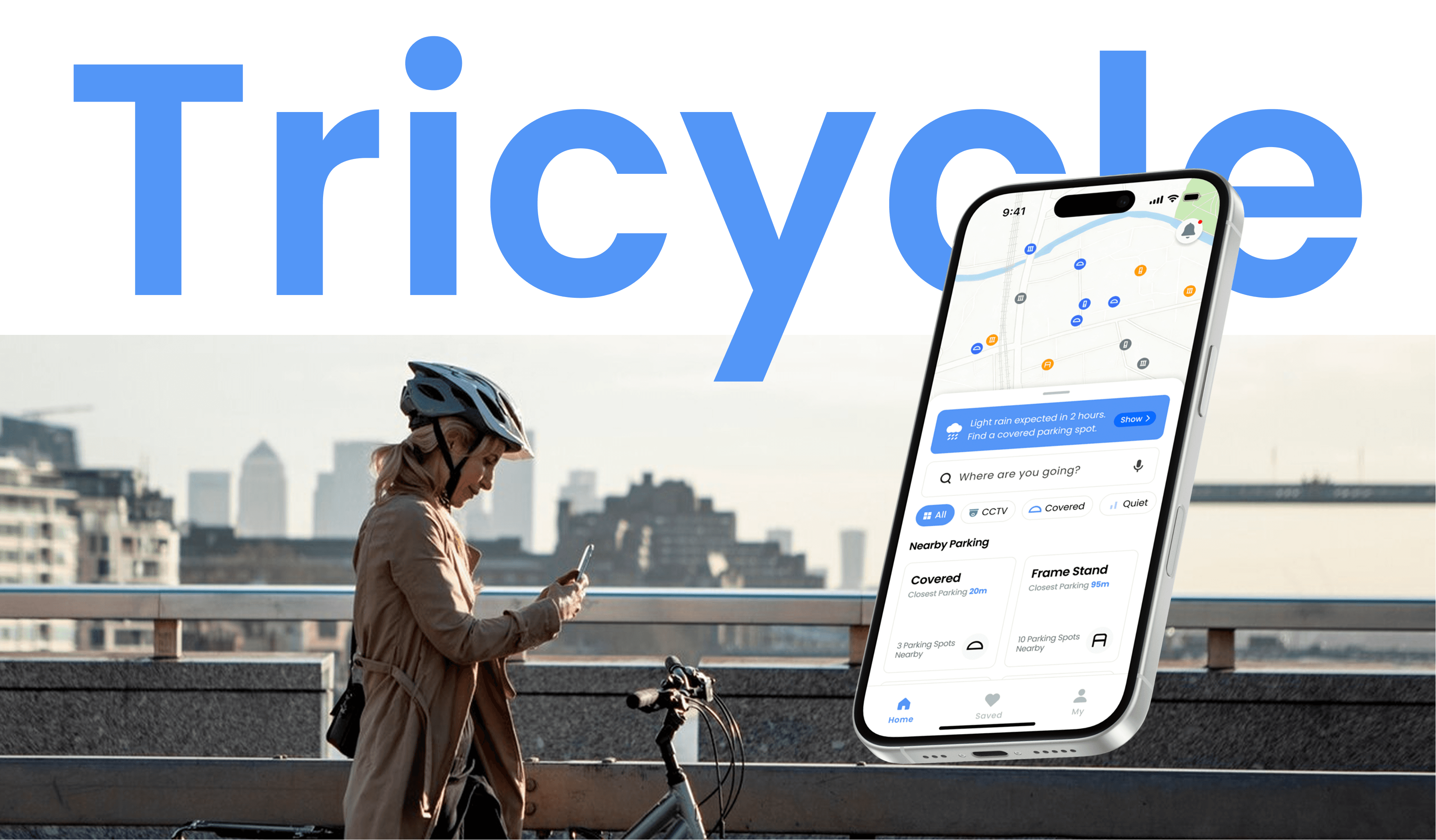
Tricycle helps urban cyclists make safer parking decisions by showing trustworthy information about availability, safety, and nearby conditions.
Tricycle helps urban cyclists make safer parking decisions by showing trustworthy information about availability, safety, and nearby conditions.
DURATION
March 2024 - June 2024
ROLE
Product Designer / Solo Project
TOOL
Figma, Protopie
Overview
Tricycle is a mobile app concept that supports urban cyclists at the moment of parking decision. Rather than only showing locations, it helps users assess whether a spot feels safe, available, and reliable before they arrive.
Tricycle is a mobile app concept that supports urban cyclists at the moment of parking decision. Rather than only showing locations, it helps users assess whether a spot feels safe, available, and reliable before they arrive.
Urban cyclists struggle to trust parking options before they arrive
Urban cyclists struggle to trust parking options before they arrive
Problems
In London, high levels of bicycle theft make cyclists anxious about where to park, especially in unfamiliar or crowded areas. This anxiety is made worse by uncertainty around parking availability, as cyclists often do not know whether a location will have space when they arrive. Without clear and reliable information about both safety and availability, cyclists are forced to make rushed decisions, which increases stress and can lead to unsafe parking choices.
In London, high levels of bicycle theft make cyclists anxious about where to park, especially in unfamiliar or crowded areas. This anxiety is made worse by uncertainty around parking availability, as cyclists often do not know whether a location will have space when they arrive. Without clear and reliable information about both safety and availability, cyclists are forced to make rushed decisions, which increases stress and can lead to unsafe parking choices.
Survey
Response
82 Cyclists
Duration
01.04 - 06.04
Tool
Google Forms
71%
ranked security as the top factor when deciding where to park, above availability (69%), distance (53%), covered parking (41%), and ease of locking (36%).
*Multiple responses allowed.
ranked security as the top factor when deciding where to park, above availability (69%), distance (53%), covered parking (41%), and ease of locking (36%).
*Multiple responses allowed.
69 %
changed where they parked when spaces were full, while 48% were influenced by weather conditions, showing that both availability and the surrounding environment shape parking decisions.
changed where they parked when spaces were full, while 48% were influenced by weather conditions, showing that both availability and the surrounding environment shape parking decisions.
67%
of cyclists felt at least slightly uneasy when parking, suggesting that parking is often a stressful part of the journey.
of cyclists felt at least slightly uneasy when parking, suggesting that parking is often a stressful part of the journey.
These findings showed that the design needed to reduce uncertainty, surface trust signals early, and support quick comparisons in real-world conditions.
These findings showed that the design needed to reduce uncertainty, surface trust signals early, and support quick comparisons in real-world conditions.
Competitive Analysis
What existing apps do well
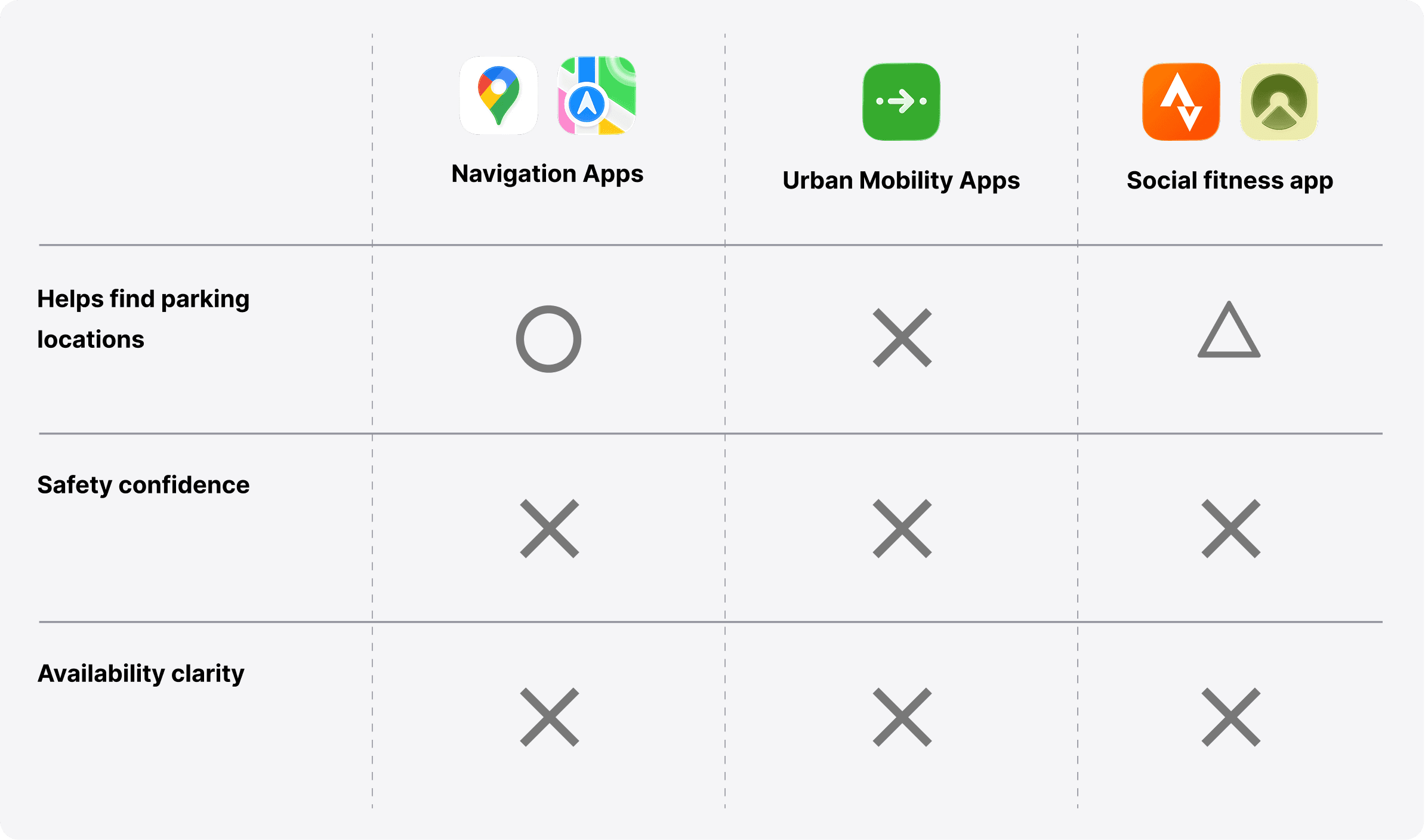
They help users move efficiently from A to B.
They help users move efficiently from A to B.
What they miss
They provide limited support for judging parking confidence near arrival.
They provide limited support for judging parking confidence near arrival.
Opportunity for Tricycle
Support trust-based parking decisions through visible safety, availability, and contextual cues.
Support trust-based parking decisions through visible safety, availability, and contextual cues.
User Journey
Key journey breakdowns
01
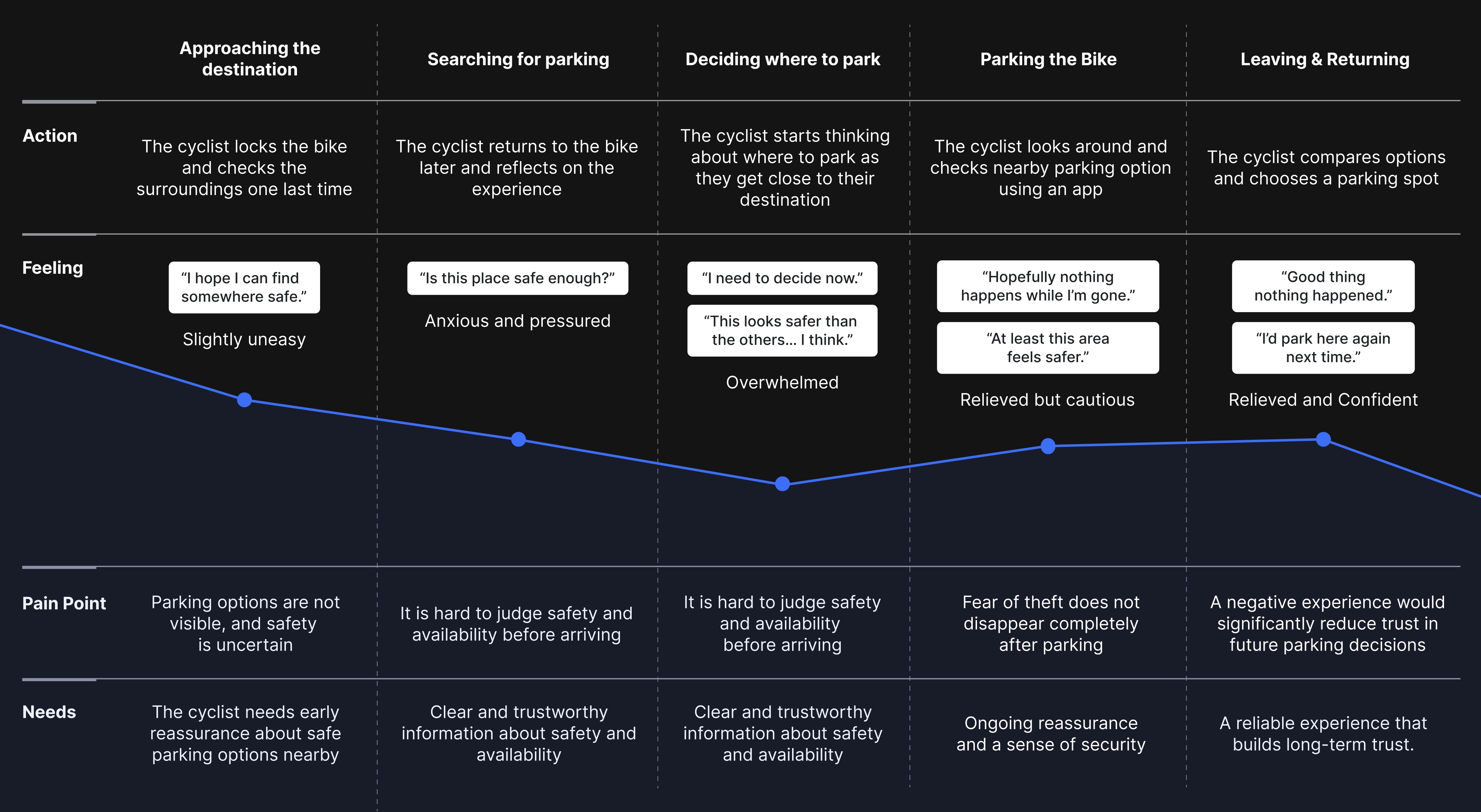
The highest stress happens before parking, when cyclists must decide quickly with limited trust.
The highest stress happens before parking, when cyclists must decide quickly with limited trust.
02
The problem is not missing information, but missing confidence in that information.
The problem is not missing information, but missing confidence in that information.
03
A bad parking experience weakens trust in future choices, not just the current trip.
A bad parking experience weakens trust in future choices, not just the current trip.
How might we reduce uncertainty and increase trust at the moment cyclists choose where to park?
How might we reduce uncertainty and increase trust at the moment cyclists choose where to park?
Design Principles
Reduce uncertainty at the point of decision
Help users understand which parking option feels safer and more reliable before they arrive.
Help users understand which parking option feels safer and more reliable before they arrive.
Enable fast comparisons between nearby options
Help users quickly compare safety, distance, and availability when time or attention is limited.
Help users quickly compare safety, distance, and availability when time or attention is limited.
Show safety and availability through clear visual cues
Support confident decisions through live occupancy, CCTV, and community reviews.
Support confident decisions through live occupancy, CCTV, and community reviews.
Core User Flow
Based on the research insights, the flow was designed to support quick and confident parking decisions through visible safety cues, clear comparisons, and low-friction navigation.
Based on the research insights, the flow was designed to support quick and confident parking decisions through visible safety cues, clear comparisons, and low-friction navigation.
Parking Overview
Users scan nearby options through visible trust and availability signals.
Users scan nearby options through visible trust and availability signals.
Parking Detail
Users review safety, availability, and distance before making a decision.
Users review safety, availability, and distance before making a decision.
Navigation
Users move toward the selected parking spot with minimal friction.
Users move toward the selected parking spot with minimal friction.
Parking Complete and Feedback
Users leave quick updates to keep spot information fresh for others
Users leave quick updates to keep spot information fresh for others
Design System
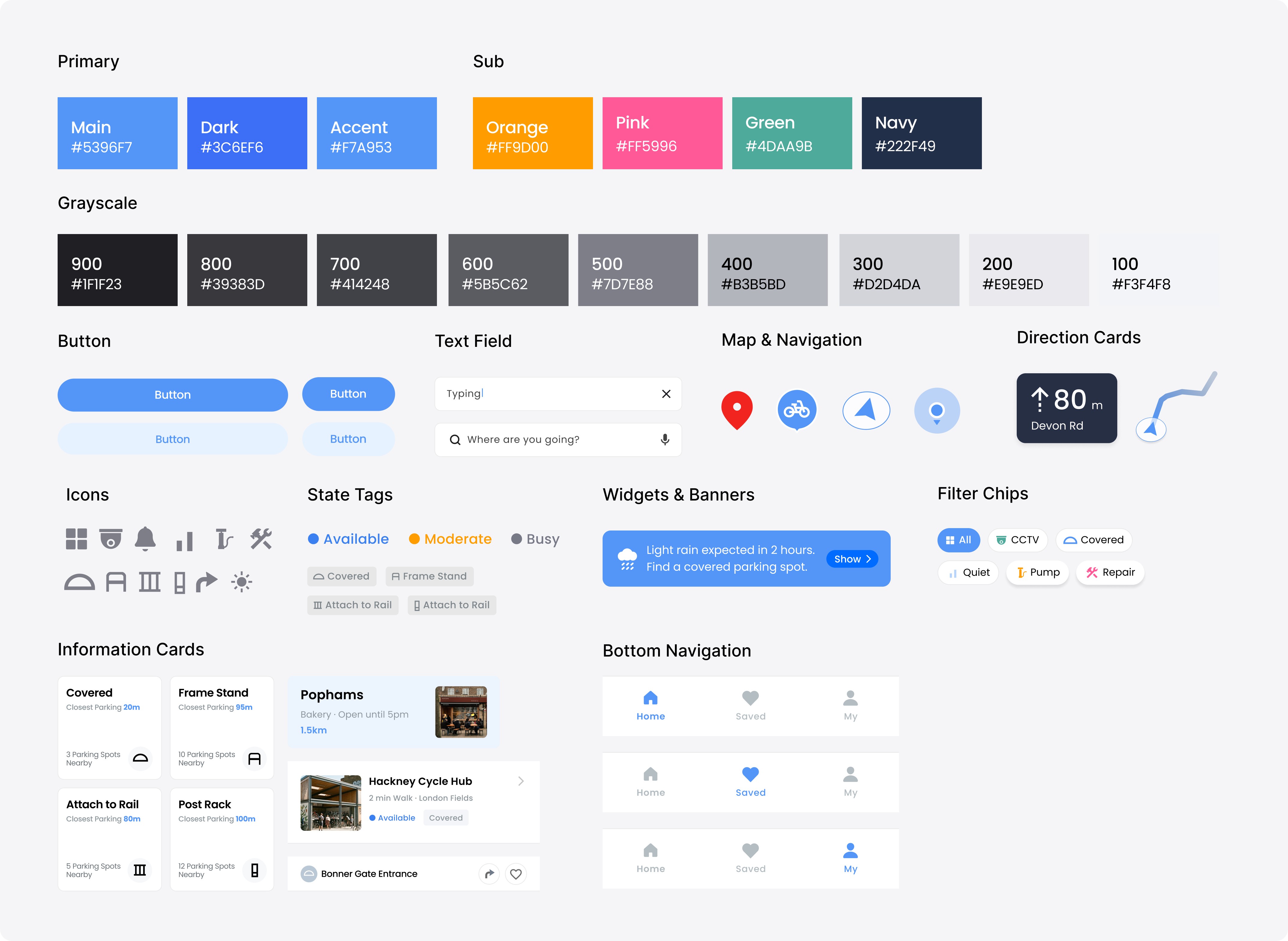
The system was designed to support fast, trust-based decisions in a map-heavy context. Clear blue emphasis was used to highlight primary actions, while status tags and cards were structured for quick scanning of safety and availability cues.
The system was designed to support fast, trust-based decisions in a map-heavy context. Clear blue emphasis was used to highlight primary actions, while status tags and cards were structured for quick scanning of safety and availability cues.
Final solution
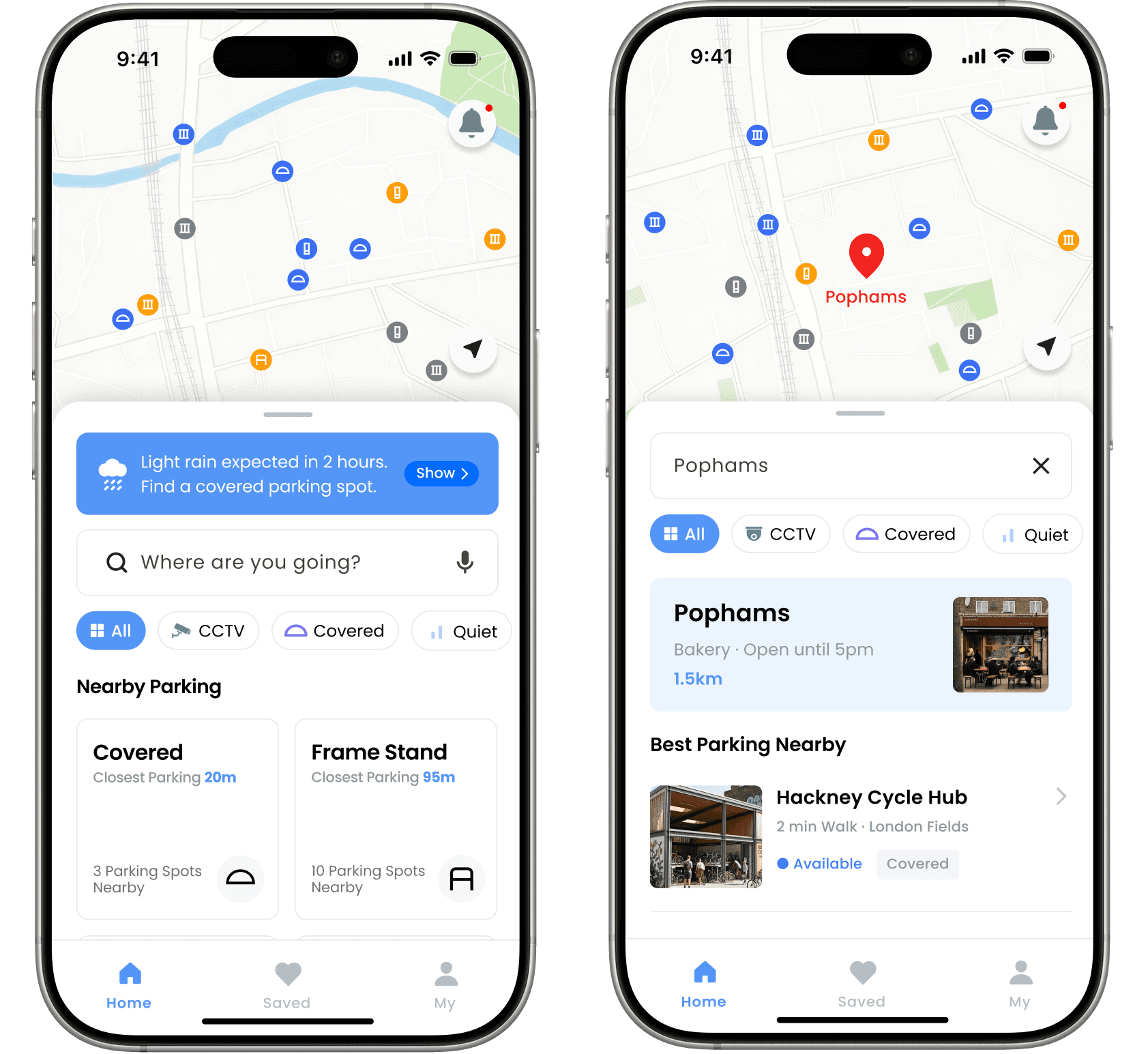
Scenario 01
This simplified flow highlights how cyclists move through the app at the moment of parking decision. Each step prioritises clarity, trust, and speed in busy urban environments.
This simplified flow highlights how cyclists move through the app at the moment of parking decision. Each step prioritises clarity, trust, and speed in busy urban environments.
Task 1
Assess the safety of the facility and make a confident decision.
Assess the safety of the facility and make a confident decision.
Key Feature
Integrated destination search with nearby parking suggestions
Integrated destination search with nearby parking suggestions
Justification
Cyclists often have to search for both a destination and a parking spot separately. Integrating destination search, nearby parking suggestions, and weather-based widgets into one view reduces double-search behaviour and gives users useful context before they begin navigating.
Cyclists often have to search for both a destination and a parking spot separately. Integrating destination search, nearby parking suggestions, and weather-based widgets into one view reduces double-search behaviour and gives users useful context before they begin navigating.
Scenario 02
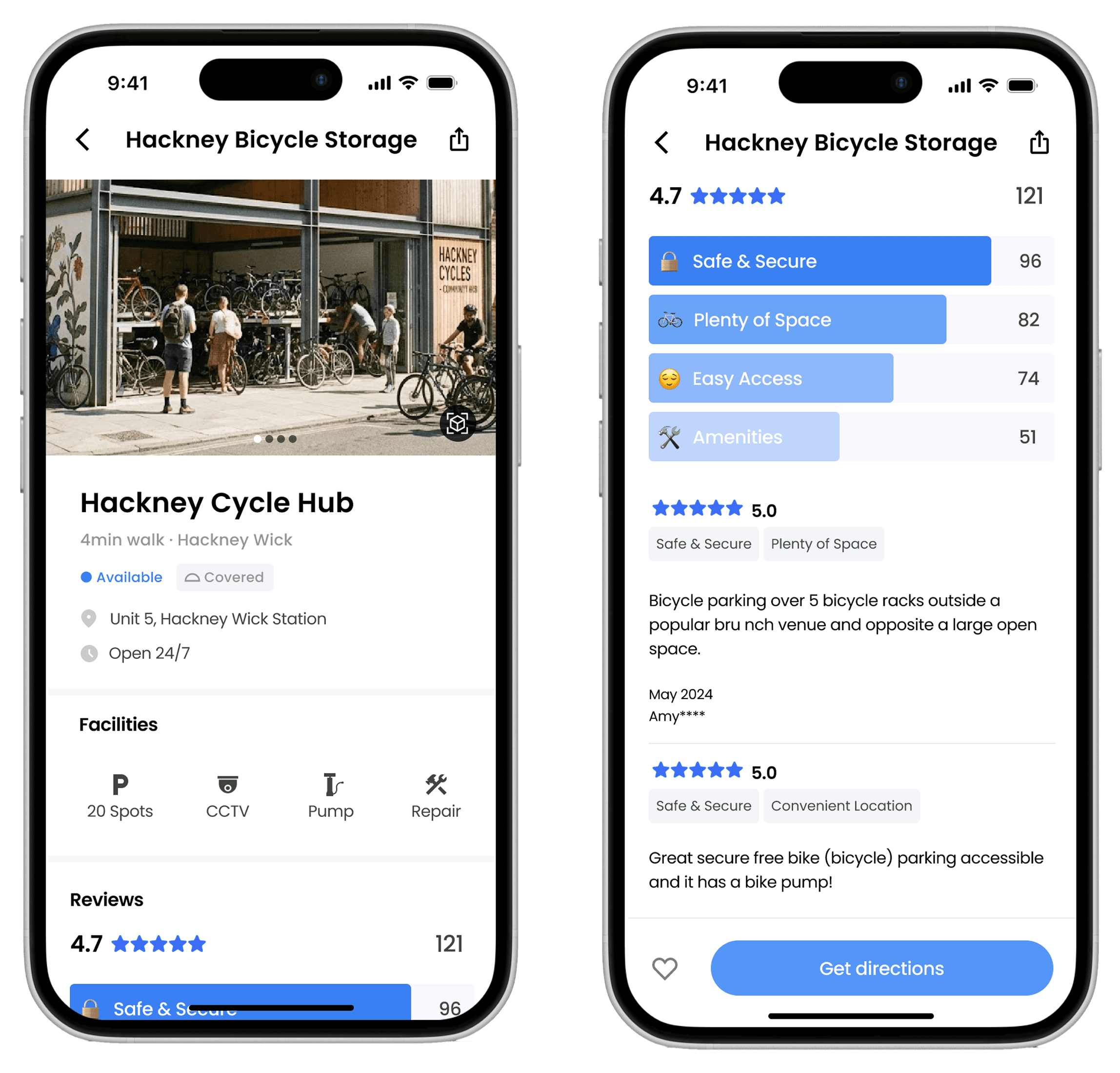
A rider evaluates a potential parking spot and needs immediate reassurance about its security to alleviate theft anxiety.
A rider evaluates a potential parking spot and needs immediate reassurance about its security to alleviate theft anxiety.
Task 2
Assess the safety of the facility and make a confident decision.
Assess the safety of the facility and make a confident decision.
Key Feature
Scannable Facility Icons & Visualised Safety Reviews
Scannable Facility Icons & Visualised Safety Reviews
Justification
Instead of relying on long-form reviews, the interface surfaces CCTV, coverage, and review tags as quick confidence signals. This helps users judge a spot without slowing down the decision.
Instead of relying on long-form reviews, the interface surfaces CCTV, coverage, and review tags as quick confidence signals. This helps users judge a spot without slowing down the decision.
Scenario 03
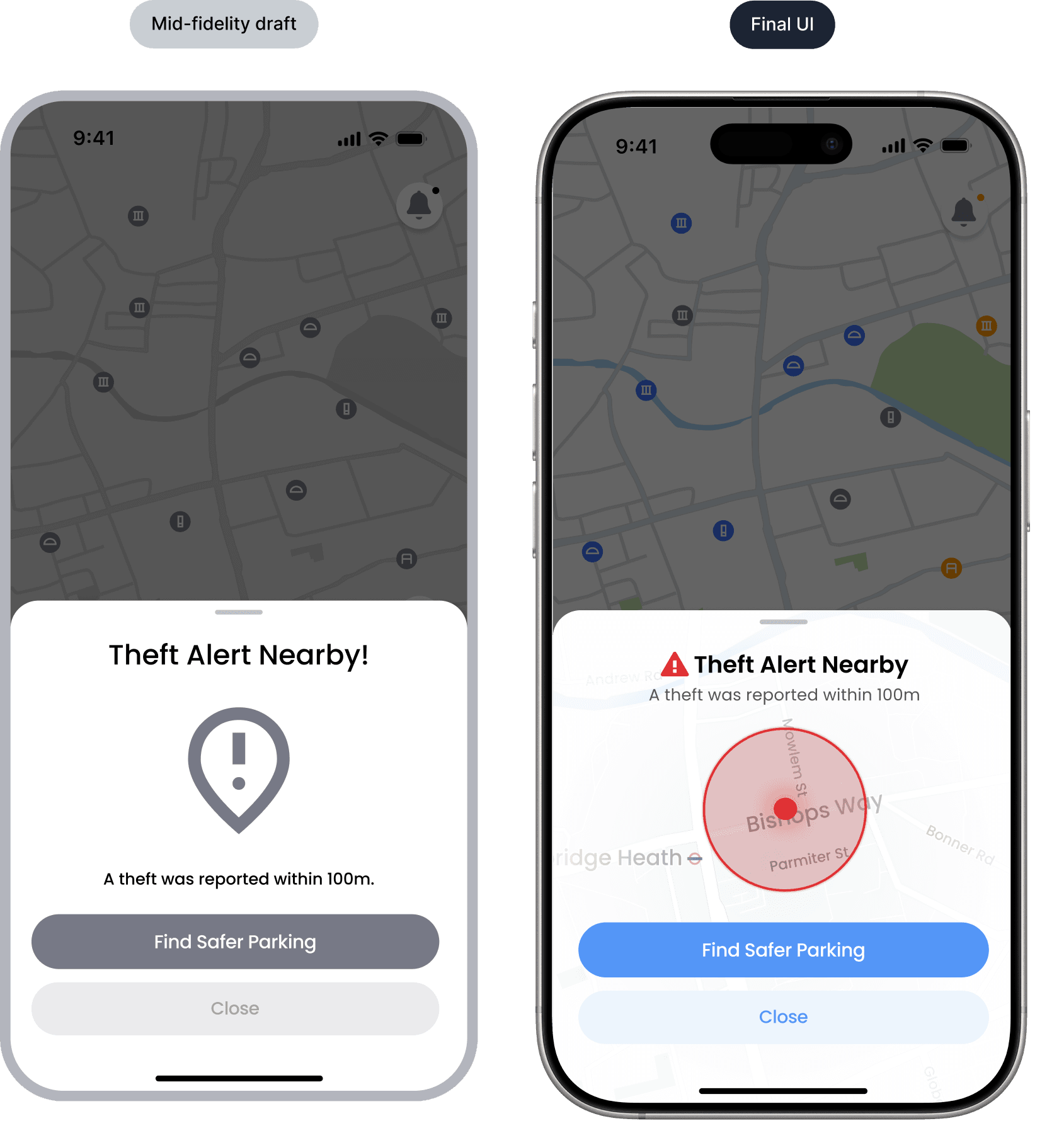
The rider has successfully parked. The app now asks for a quick update on the spot's status to help the next cyclist.
The rider has successfully parked. The app now asks for a quick update on the spot's status to help the next cyclist.
Task 3
Contribute real-time updates about the parking spot quickly and with minimal effort.
Contribute real-time updates about the parking spot quickly and with minimal effort.
Key Feature
Tap-based feedback flow with lightweight status reporting
Tap-based feedback flow with lightweight status reporting
Justification
After parking, riders are unlikely to spend time writing detailed feedback. Quick yes/no responses and tap-based chips reduce effort while making it easier to keep parking information current.
After parking, riders are unlikely to spend time writing detailed feedback. Quick yes/no responses and tap-based chips reduce effort while making it easier to keep parking information current.
Scenario 04
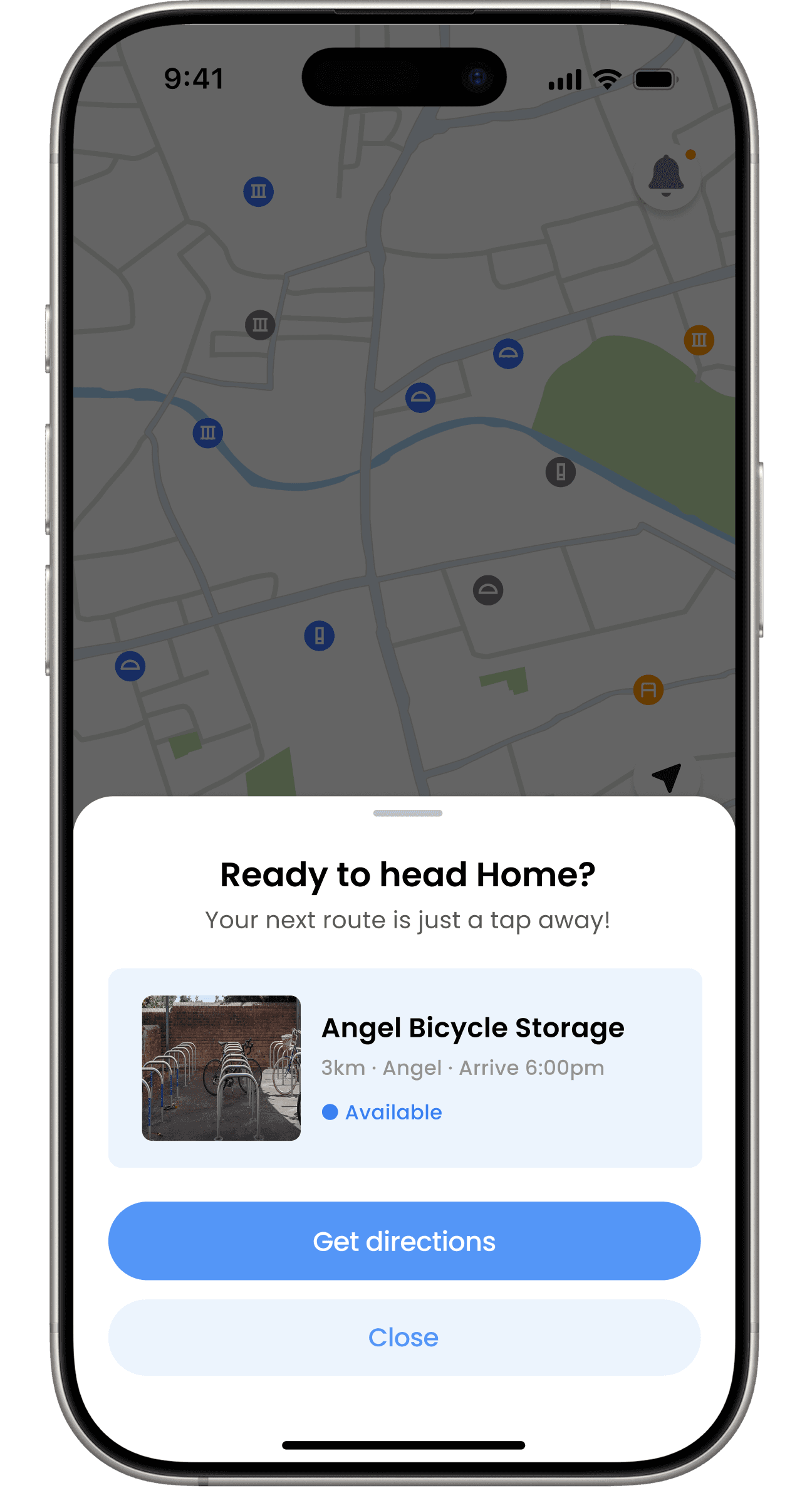
The user is away from their parked bike. A potential theft is reported nearby, and the user needs to quickly understand the threat and take action.
Task 4
Respond to a theft alert and decide what safer action to take.
Key Feature
Map-based theft alert with risk zone visualisation
Justification
A generic warning can raise anxiety without offering useful direction. Visualising the theft risk area on the map gives riders clearer context and helps them decide on a safer next step.
Scenario 05
The user is ready to return and needs a quick way to find their parked bike without searching again.
The user is ready to return and needs a quick way to find their parked bike without searching again.
Task 5
Return to the parked bicycle quickly and without extra searching.
Return to the parked bicycle quickly and without extra searching.
Key Feature
Quick return routing with saved parking location
Justification
By analysing the time elapsed since parking and the user's routine, the app proactively anticipates the next logical destination ("Home"). This eliminates the repetitive, high-friction task of manually typing an address, offering a true zero-search experience right upon launching the app.
By analysing the time elapsed since parking and the user's routine, the app proactively anticipates the next logical destination ("Home"). This eliminates the repetitive, high-friction task of manually typing an address, offering a true zero-search experience right upon launching the app.
Product Features
Context-Aware Smart Alerts
Notifications are tailored to exact real-world situations, such as sudden rain or local market days.
Each notification is hyper-relevant to the rider's current context. Instead of just sending generic updates, the smart alerts provide actionable suggestions, allowing users to make quick decisions on the go without unlocking their phones.
Notifications are tailored to exact real-world situations, such as sudden rain or local market days.
Each notification is hyper-relevant to the rider's current context. Instead of just sending generic updates, the smart alerts provide actionable suggestions, allowing users to make quick decisions on the go without unlocking their phones.
Reflection
One of the main design challenges was balancing reassurance with speed. Cyclists wanted richer context around safety and availability, but too much information could slow decisions in busy, real-world moments. This pushed me to design for quick trust, not just feature completeness.
One of the main design challenges was balancing reassurance with speed. Cyclists wanted richer context around safety and availability, but too much information could slow decisions in busy, real-world moments. This pushed me to design for quick trust, not just feature completeness.
What I’d test next
• Whether safety and availability signals are understandable at a glance
• Whether alerts feel actionable without increasing anxiety
• How community-driven spot updates can stay reliable over time
• Whether safety and availability signals are understandable at a glance
• Whether alerts feel actionable without increasing anxiety
• How community-driven spot updates can stay reliable over time